
The fastest way to launch a first course, with clean checkout, sales tax handling and free student apps. Product caps and Growth-only certificates make it pricier as you expand.
- Course building 25%7.5
- Fees at real revenue 20%7.0
- Selling and marketing 20%6.5
- Student experience 15%7.5
- Ease of setup 10%9.0
- Support and portability 10%6.0
- Very easy to set up and launch
- Unlimited students on every plan
- Handles checkout, payment plans and sales tax
- Free student mobile apps
- No Teachable fee from Builder up
- Product caps of 5, 10 and 50 by plan
- Certificates only on the Growth plan
- 7.5% fee on Starter
- Limited email marketing and website tools
On this page
- What Is Teachable?
- Building a Course on Teachable
- How Selling Works on Teachable
- Teachable Pricing in 2026
- Which Teachable Plan Do You Actually Need?
- What Your Students Get
- What a Realistic Teachable Launch Looks Like
- Moving Your Course to or From Teachable
- Teachable Pros and Cons
- Teachable Compared With Its Main Rivals
- Who Is Teachable Best For?
- Teachable Review FAQs
- Bottom Line on Teachable
Here’s our Teachable review in a sentence: it’s the simplest way to put a course online and start taking payments, but its plans are built around product limits you need to understand before you sign up. You can launch a polished course site in an afternoon, students get free mobile apps and Teachable handles checkout and sales tax. In exchange, you’re capped at 5, 10 or 50 products depending on your plan, certificates only arrive on the $139 Growth plan, and the cheapest plan takes 7.5% of every sale.
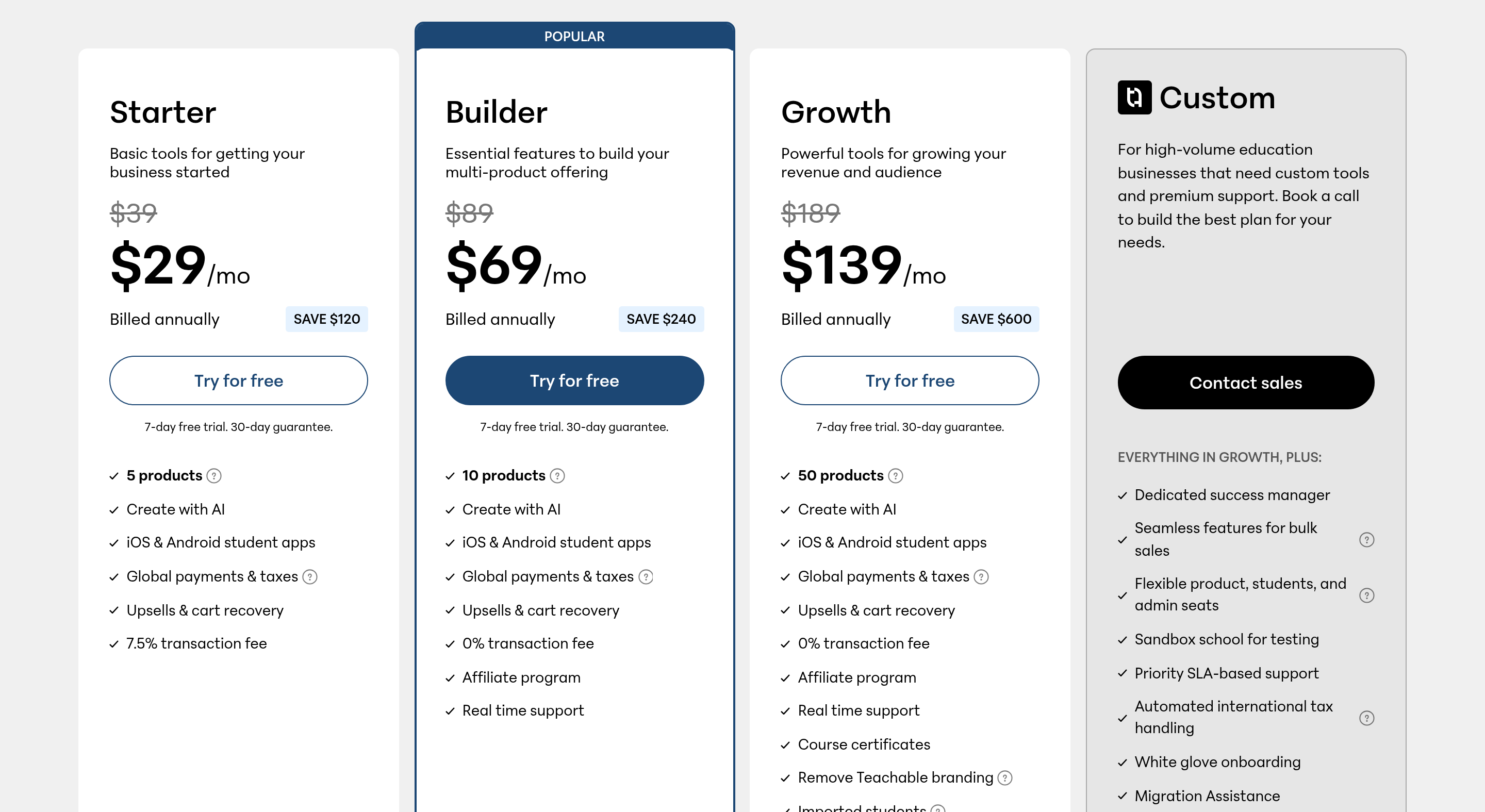
- Starter runs $29 monthly on annual billing ($39 on monthly billing) and keeps 7.5% of each sale.
- Builder is $69 a month yearly ($89 monthly), and Growth is $139 yearly ($189 monthly). Neither takes a platform cut as long as sales run through Teachable’s own checkout.
- Product limits are 5, 10 and 50, while student numbers are unlimited on every plan.
- You get a free week to try any paid plan, plus a 30-day refund window after you pay.
- Card processing of 2.9% plus 30 cents applies to US sales on every plan.
What Is Teachable?
Teachable is a hosted platform for selling online courses, coaching, digital downloads and memberships. It launched in 2014 and has been owned by the Brazilian creator-economy company Hotmart since 2020. It hosts your videos, builds your sales pages, runs checkout and delivers content to students on the web and in its iOS and Android apps.
Its pitch has always been ease of use. You don’t need a website, a payment processor or a separate video host. That makes it popular with first-time creators: coaches, consultants, fitness instructors and subject experts who want to sell what they know without learning web development.
Building a Course on Teachable
The course editor is easy to pick up. You create sections, add lessons and drop in video, audio, PDFs, text, quizzes and downloadable files. You can drip content on a schedule, lock lessons until students finish earlier ones and preview everything as a student before you publish.
Every plan includes Teachable’s “Create with AI” tools, which can help draft a course outline, lesson text, quizzes and sales copy. They speed up the blank-page stage, but expect to rewrite what they produce in your own voice.
Other building features worth knowing:
- Video hosting with up to 1TB of storage on every standard plan.
- Coaching products for selling one-on-one sessions alongside courses.
- Digital downloads like templates, ebooks and worksheets.
- Community spaces, listed from the Builder plan up.
- Free subtitles and translations on Growth, which helps if you sell internationally.
How Selling Works on Teachable
Teachable’s checkout supports one-time payments, subscriptions and payment plans, along with coupons, upsells and cart abandonment recovery. With Teachable Payments, the platform handles the payment processing and collects and remits sales tax and VAT in many regions, which saves first-time sellers a real headache.
The Builder plan adds an affiliate program, so former students and partners can earn a share of the sales they send you. Growth adds features that matter as you get bigger: removing Teachable branding, importing existing students, five admin users and custom admin permissions.
Where Teachable is thinner is marketing. It doesn’t have the built-in email campaigns, funnels or full website builder that all-in-one platforms like Kajabi include. Most Teachable creators connect a separate email tool, so budget for that.
Teachable Pricing in 2026
These are the US prices on Teachable’s pricing page, checked in November 2026:
| Plan | Per month, annual | Per month, monthly | Teachable fee | Products | Admins |
|---|---|---|---|---|---|
| Starter | $29/mo | $39/mo | 7.5% | 5 | 1 |
| Builder | $69/mo | $89/mo | 0% | 10 | 1 |
| Growth | $139/mo | $189/mo | 0% | 50 | 5 |
| Custom | Quote from sales | 0% | Custom | Flexible | |
Processing is charged on top everywhere. A US card sale costs 2.9% + 30¢. Builder and Growth only waive Teachable’s own fee when the sale goes through Teachable Payments.
Be aware that these plans are fairly new. In mid-2025, Teachable restructured its pricing and moved existing customers onto the new plans. FreshLearn, a competing platform, reported that some long-time creators saw their costs rise sharply because of the new product limits. If you’re comparing with older reviews, check which plan structure they describe.
Which Teachable Plan Do You Actually Need?
Most creators pick a plan based on price, then hit a product limit a few months later. A better approach is to count what you’ll sell. Each course, coaching offer, download or membership you sell counts as a product, so the numbers add up faster than you’d think. Here’s how five common setups map to a plan, with yearly costs including Teachable’s fee but not card processing:
| Your setup | Monthly sales | Best plan | Yearly cost |
|---|---|---|---|
| One course and one ebook, just launching | $300 | Starter | $348 plus $270 in fees = $618 |
| One course selling steadily | $1,500 | Builder | $828 (Starter would cost $1,698) |
| Three courses, a coaching offer, two downloads and a bundle | Any | Builder | $828 (7 products is over Starter’s cap) |
| You want completion certificates | Any | Growth | $1,668 |
| A team of three managing the school | Any | Growth | $1,668 (Builder allows one admin) |
Two takeaways stand out. Starter only makes sense while your sales are small, because the 7.5% fee quickly outweighs the savings. And certificates or a second admin push you straight to Growth, which more than doubles your cost. If either matters to you, compare Thinkific, which includes certificates and multiple admins on its entry plan.
What Your Students Get
Students sign in to a clean, distraction-free course player on the web or in Teachable’s free phone and tablet apps. Video progress syncs across devices, and lessons can include quizzes, downloads and comments. Enrollment is uncapped on all three standard plans when students buy through Teachable’s checkout, which removes one worry as you grow.
The student side is simple by design. You won’t get gamification, leaderboards or a built-in branded app on standard plans. For most self-paced courses, that’s fine. For community-heavy programs, a platform like Skool or Kajabi gives students more to do between lessons.
What a Realistic Teachable Launch Looks Like
Speed is Teachable’s main selling point, so it’s worth knowing what a realistic launch looks like. Assuming your videos are already recorded, most creators move through these steps in a few days:
- Create your school and pick a name, colors and logo. This takes minutes.
- Upload your curriculum section by section. Bulk video upload helps, but expect an evening or two for a full course.
- Write the sales page using Teachable’s templates, with AI help for a first draft.
- Set pricing: a one-time price, a payment plan, a subscription or several options side by side.
- Connect payouts through Teachable Payments and run a test purchase with a coupon set to 100% off.
- Connect your email tool so new buyers land on your list automatically.
Use the free week to do steps one through five with a single module. If anything feels clumsy, such as the sales page editor or payout setup, you’ll find out before paying.
The slowest part for most people is the content itself, not the platform. If you’re still recording, plan your launch date around finished videos rather than around the trial clock.
Moving Your Course to or From Teachable
Switching platforms later is always some work, so it’s worth thinking about before you start. Moving to Teachable usually means re-uploading videos, rebuilding lessons and importing your student list. Importing existing students is a Growth plan feature, and the Custom plan includes migration help.
Leaving Teachable works the same way in reverse. You can export student and sales data, but you’ll rebuild course pages elsewhere, and active subscriptions may need students to re-subscribe on the new platform. Keeping your original video files and lesson text in your own cloud folder makes any future move far easier.
Teachable Pros and Cons
Why creators choose it
- Very easy to set up and launch
- Unlimited students on every plan
- Handles checkout, payment plans and sales tax
- Free mobile apps for your students
- No Teachable fee from Builder up
Why some leave
- Hard caps on how many products you can sell
- Certificates only on the $139 Growth plan
- 7.5% fee on Starter
- Limited email marketing and website tools
- One admin user below Growth
Teachable Compared With Its Main Rivals
| Platform | Entry price (yearly billing) | Better than Teachable for |
|---|---|---|
| Thinkific | $82/mo | Unlimited products, certificates and more admins from the start |
| Kajabi | $143/mo | Built-in email, funnels and website in one place |
| Podia | $42/mo | Simple storefront with email marketing for small creators |
| LearnWorlds | $44/mo | Interactive video and corporate training features |
Who Is Teachable Best For?
Your first course is ready and you want it selling within days
Teachable’s setup is about as simple as it gets.
You’ll sell a handful of products and want no transaction fee
Builder covers up to 10 products for $69 a month.
You sell to buyers in many countries
Teachable Payments’ tax handling is a real time saver.
You plan a big catalog or need certificates cheaply
Thinkific gives you both on its entry plan.
You want email, funnels and a website without extra tools
Kajabi is the better all-in-one choice.
Teachable Review FAQs
Is Teachable good for beginners?
Yes. It’s one of the easiest course platforms to learn, and you can have a course and sales page live in a day without technical skills.
Does Teachable have a free plan?
No. Paid plans start at $29 a month when paid annually, and each one gives you a free week up front and a 30-day refund window.
What counts as a product on Teachable?
Each course, coaching offer, digital download or membership you sell. You can sell up to five on Starter, ten on Builder and fifty on Growth.
Does Teachable take a cut of my sales?
Only on Starter, which charges 7.5%. Builder and Growth charge no Teachable fee with Teachable Payments. Card processing fees apply on every plan.
Can I issue certificates on Teachable?
Certificates of completion are included on the Growth plan and above.
Can I sell memberships or subscriptions on Teachable?
Yes. You can charge a recurring subscription for a course or membership, offer payment plans and run one-time prices side by side. Each membership counts toward your product limit.
Is Teachable or Thinkific better?
Teachable is quicker to set up and cheaper to start. Thinkific pulls ahead once your catalog grows past a handful of offers, or when certificates and extra team seats matter, because it includes them on its entry tier.
Bottom Line on Teachable
Teachable is a great place to launch a first course quickly, with clean checkout, tax handling and free student apps. Start on Starter while sales are small, move to Builder as soon as revenue picks up, and count your products before you commit to a plan. If you need certificates, many products or a team, look closely at Thinkific before you decide.
You reached the last module. 3 in 100 do.
Up next for Teachable:
ComparisonTeachable vs Thinkific