
On this page
The best Python courses in 2026 are Python for Everybody for complete beginners, Harvard’s CS50P for a structured free course, and Angela Yu’s 100 Days of Code if you learn best by building projects. Five of the eight courses below are free, and the paid ones cost less than a dinner out when they’re on sale.
The bigger decision isn’t free versus paid. It’s format and time. Python for Everybody lists about 79 hours of material. The Google IT Automation certificate lists 134. If you can study five hours a week, that’s the difference between finishing before spring and finishing next fall. So for each course below, I’ve included the hours the provider publishes, the format and what you’ll actually build, checked in October 2026.
Not sure where to start? One of these four fits most people.
Best for total beginners
Python for Everybody
University of Michigan’s gentle five-course series. Assumes no experience at all.
About 79 hours, free to learn
Best free structured course
Harvard CS50P
Ten weeks of lectures and problem sets, ending with a project of your own.
10 weeks, free
Best for learning by building
100 Days of Code
A project every day, from games to web apps, in one 60-hour video course.
About 60 hours, $129.99 list (frequently discounted)
Best for automating your job
Automate the Boring Stuff
Al Sweigart’s free book on spreadsheets, PDFs, email and web scraping with Python.
24 chapters, free online
The Best Python Courses Compared
Here are all eight side by side, sorted roughly from most beginner-friendly to most career-focused:
| Course | Format | Hours listed | Cost | Certificate |
|---|---|---|---|---|
| Python for Everybody | Video and quizzes | About 79 | Free materials, paid certificate | Coursera |
| Harvard CS50P | Lectures and problem sets | 10 weeks | Free | Paid, on edX |
| Automate the Boring Stuff | Book | 24 chapters | Free online | No |
| University of Helsinki MOOC | Text and auto-graded exercises | 14 parts | Free | University credits possible |
| freeCodeCamp Python | Interactive challenges and projects | 15 projects | Free | Free |
| Codecademy Learn Python 3 | In-browser interactive lessons | Self-paced | Free Basic, Plus $29.99/month or $14.99/month billed annually | With paid plans |
| 100 Days of Code | Video with daily projects | About 60 | $129.99 list (frequently discounted), or subscription from $13.00/month | Udemy completion |
| Google IT Automation with Python | Video, labs and graded work | About 134 | Coursera Plus, $59/month |
Start with Python for Everybody Try CS50P free
How Long Does It Take to Finish a Python Course?
A full beginner Python course takes about 60 to 135 hours, which is three to six months at five hours a week. Most people underestimate this, then quit around week three when the course feels endless. Here’s the math for the courses that publish an hour count:
| Course | At 5 hours a week | At 10 hours a week |
|---|---|---|
| 100 Days of Code (about 60 hours) | About 12 weeks | About 6 weeks |
| Python for Everybody (about 79 hours) | About 16 weeks | About 8 weeks |
| Google IT Automation (about 134 hours) | About 27 weeks | About 14 weeks |
Two things follow from this. First, “100 days” is a pace, not a promise. At five hours a week, the course takes closer to three months. Second, for Coursera courses, your pace sets your price. Python for Everybody at 10 hours a week fits inside two months of Coursera Plus ($118). At five hours a week, it’s four months ($236), unless you take the free route described below.
The 8 Best Python Courses, Reviewed
1. Python for Everybody (University of Michigan): Best for Total Beginners
- Format
- Short videos, quizzes and auto-graded code
- Hours
- About 79 across 5 courses
- Price
- Free materials online, or Coursera Plus for the certificate
- You’ll build
- Scripts that read files, pull web data and use a database
Go to Python for Everybody Opens coursera.org
Python for Everybody is the gentlest serious introduction to Python online. Dr. Charles Severance teaches the University of Michigan’s five-course series, and its Coursera page shows 280,000-plus reviews averaging 4.8 stars, and more than 2 million people enrolled. It’s built for people with no programming experience, and it moves at a pace that doesn’t leave anyone behind.
A big plus: the lectures and textbook are also published free at py4e.com, so you can learn everything without paying and only buy Coursera access if you want the certificate.
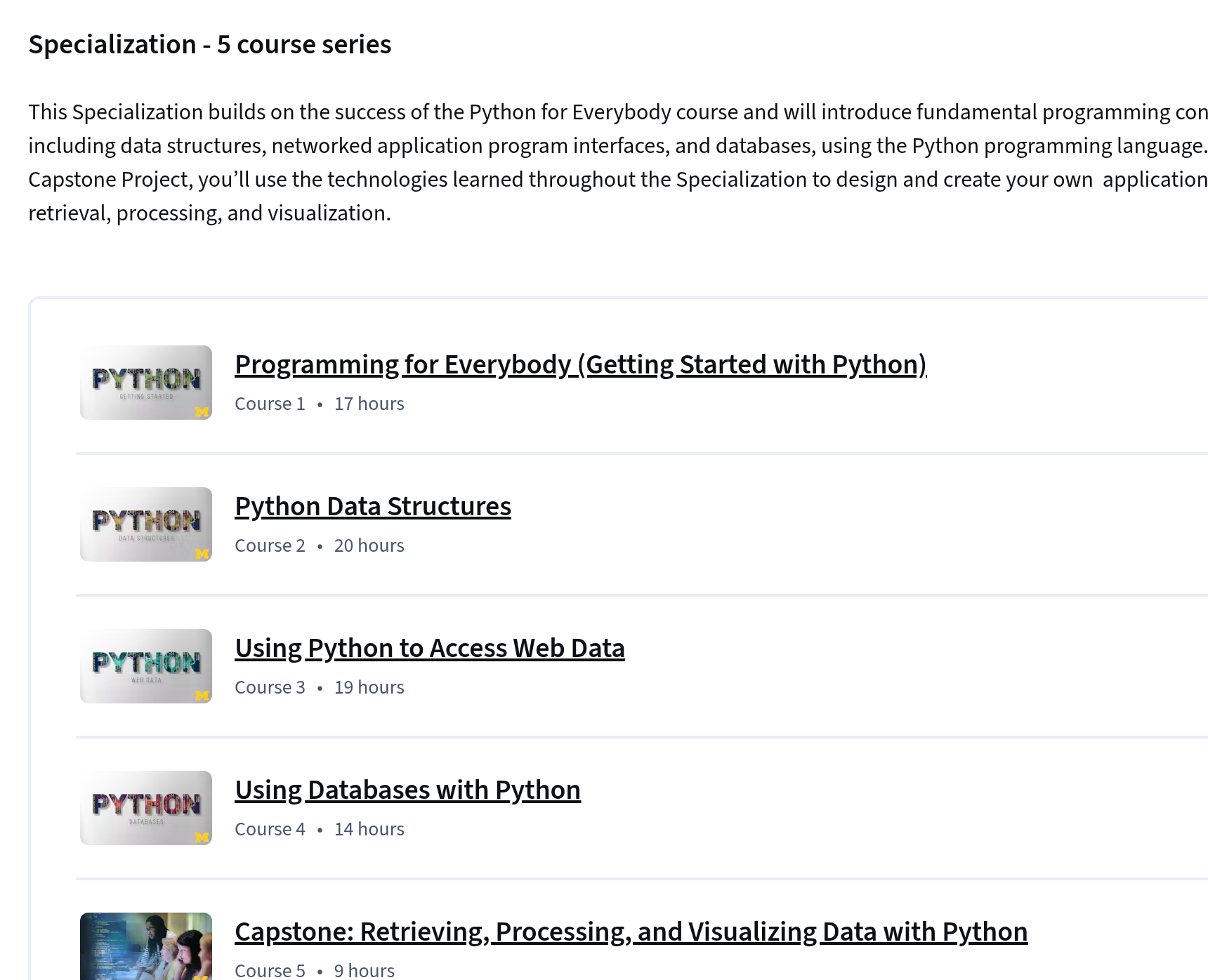
The downside is pace. If you’ve coded before, even a little, the early weeks will feel slow. Its capstone is small, so plan to build something bigger on your own afterward.
2. Harvard CS50P: Best Free Structured Course
- Format
- Lectures, problem sets and a final project
- Hours
- 10 weeks of material
- Price
- Free, paid certificates optional on edX
- You’ll build
- A final project of your own design
Go to CS50P Opens cs50.harvard.edu
CS50P is Harvard’s introduction to programming with Python, and it’s free. It’s designed for “students with or without prior programming experience who’d like to learn Python specifically”. Over ten weeks it covers functions, conditionals, loops, exceptions, libraries, unit tests, file input and output, regular expressions and object-oriented programming.
The problem sets are what set it apart. Each week you solve real exercises that are checked automatically, then finish with a final project you design yourself. Unit tests and regular expressions also make it more practical than most beginner courses.
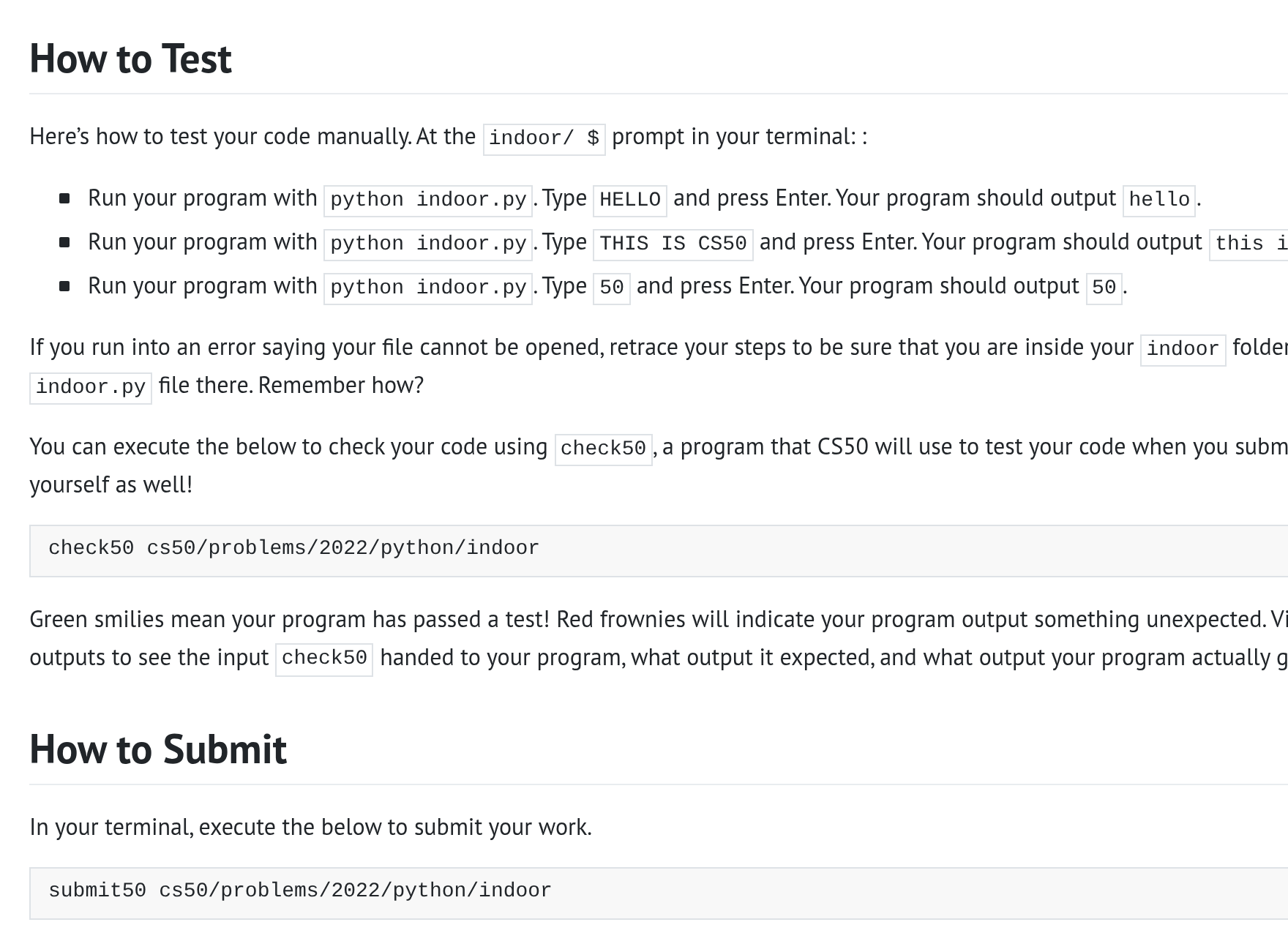
It’s harder than Python for Everybody, and the problem sets can take longer than the lectures. Expect to get stuck sometimes. That’s the point, but it can feel discouraging if you’re brand new.
3. 100 Days of Code: The Complete Python Pro Bootcamp: Best for Learning by Building
- Format
- Video lessons with a project every day
- Hours
- About 60 hours of video
- Price
- $129.99 list, frequently discounted; or a Udemy subscription from $13.00 a month
- You’ll build
- Games, automation scripts, web apps and data projects
Go to 100 Days of Code Opens udemy.com
Angela Yu’s 100 Days of Code is the most popular paid Python course for people who learn by doing. Its Udemy course page shows a 4.7 rating from 439,211 ratings, 1,896,629 students and 52 hours of on-demand video. The $129.99 list price is frequently discounted during Udemy’s sales, and the course is also included in Udemy’s subscription from $13.00 a month, so check the current price before you buy. You build something small every day, which makes the habit easier to keep.
Because it covers games, automation, web development and data in one course, it gives you a feel for what Python can do before you pick a direction.
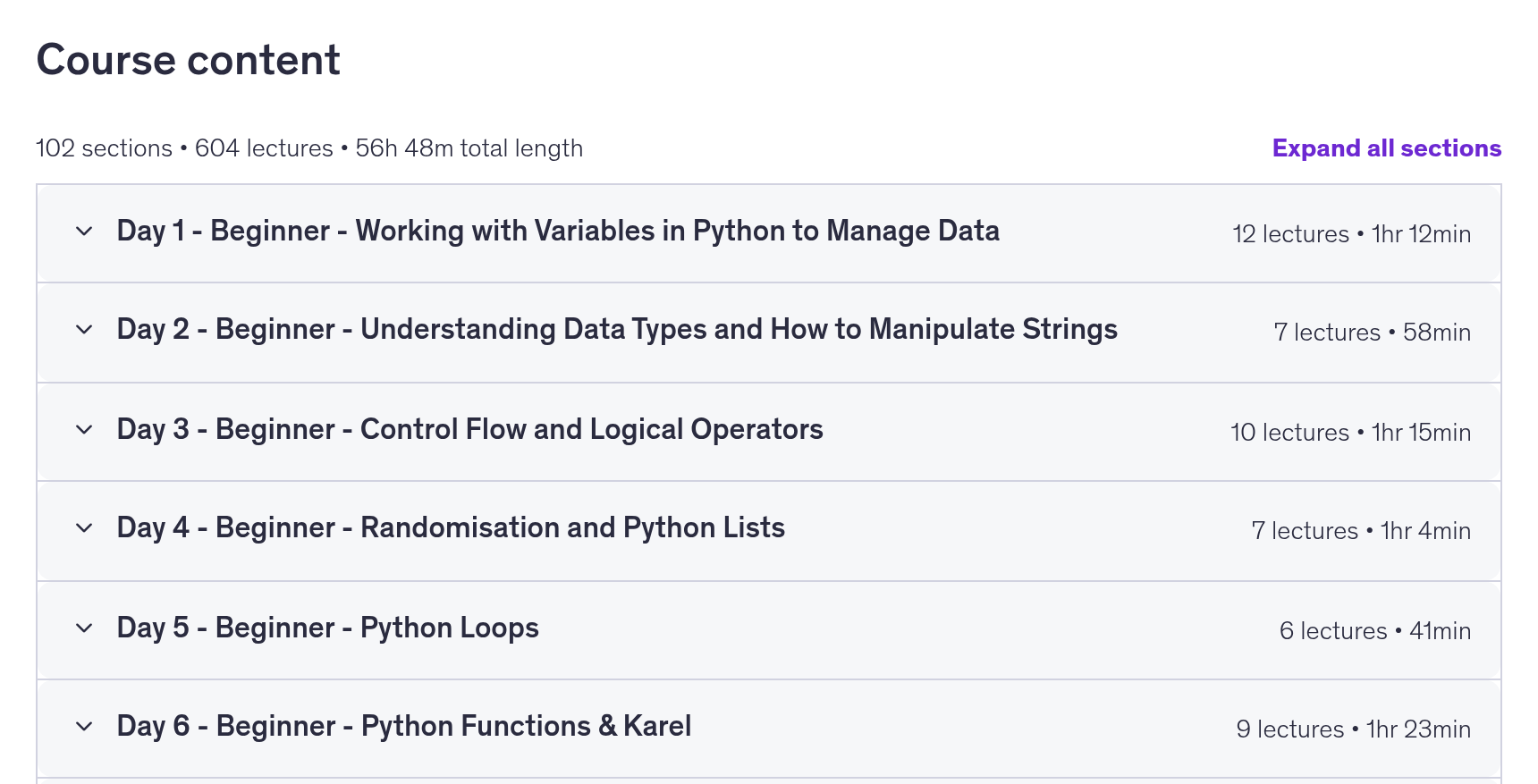
As noted above, the 100 days is optimistic. Learners who keep a normal schedule often take four to five months. And like any Udemy certificate, it only proves you finished, so your projects are what employers will care about.
4. Automate the Boring Stuff with Python: Best for Automating Your Job
- Format
- Book, free online, with an optional video course
- Hours
- 24 chapters, self-paced
- Price
- Free to read
- You’ll build
- Scripts for spreadsheets, PDFs, email and web scraping
Read Automate the Boring Stuff Opens automatetheboringstuff.com
Automate the Boring Stuff is the best Python resource for office workers who want to stop doing repetitive tasks by hand. Al Sweigart’s book, now in a fully revised third edition, is free to read online under a Creative Commons license. It starts from zero, then moves into practical projects: web scraping, working with spreadsheets, PDFs and Word documents, controlling the keyboard and mouse, and sending email or text notifications.
Its strength is relevance. By chapter ten or so, you can write a script that saves you real time at work, which keeps you motivated better than abstract exercises.
It isn’t a computer science course, and it gives no certificate. The companion Udemy video course follows much of the first edition rather than the new third edition, so the book is the more current resource.
5. University of Helsinki Python Programming MOOC: Best for Deep, Rigorous Practice
- Format
- Text lessons with automatically checked exercises
- Hours
- 14 parts across two courses
- Price
- Free
- You’ll build
- Many small programs, then larger object-oriented ones
Go to the Helsinki MOOC Opens mooc.fi
The University of Helsinki’s Python Programming MOOC is the most thorough free Python course here. It’s the same material used in the university’s computer science program, split into Introduction to Programming (Parts 1 to 7) and Advanced Course in Programming (Parts 8 to 14), each worth 5 ECTS credits. No prior programming experience is required.
The volume of practice is the draw. You write code constantly, and the exercises are checked as you go, so you can’t coast through by watching.
It’s text-based, which some learners find dry, and it’s long. The 2026 edition is open until the end of 2026, so if you start late in the year, check when the next edition opens.
6. freeCodeCamp Scientific Computing with Python: Best Free Certificate
- Format
- In-browser coding challenges and projects
- Hours
- 15 projects, self-paced
- Price
- Free, including the certification
- You’ll build
- Five certification projects that must pass automated tests
Go to freeCodeCamp Python Opens freecodecamp.org
freeCodeCamp’s Python curriculum is the best option if you want a certificate without paying anything. Its upgraded course includes 15 projects, 10 learning projects and 5 certification projects, made up of more than 500 coding challenges. Certification projects have to pass automated tests before you can claim the certificate.
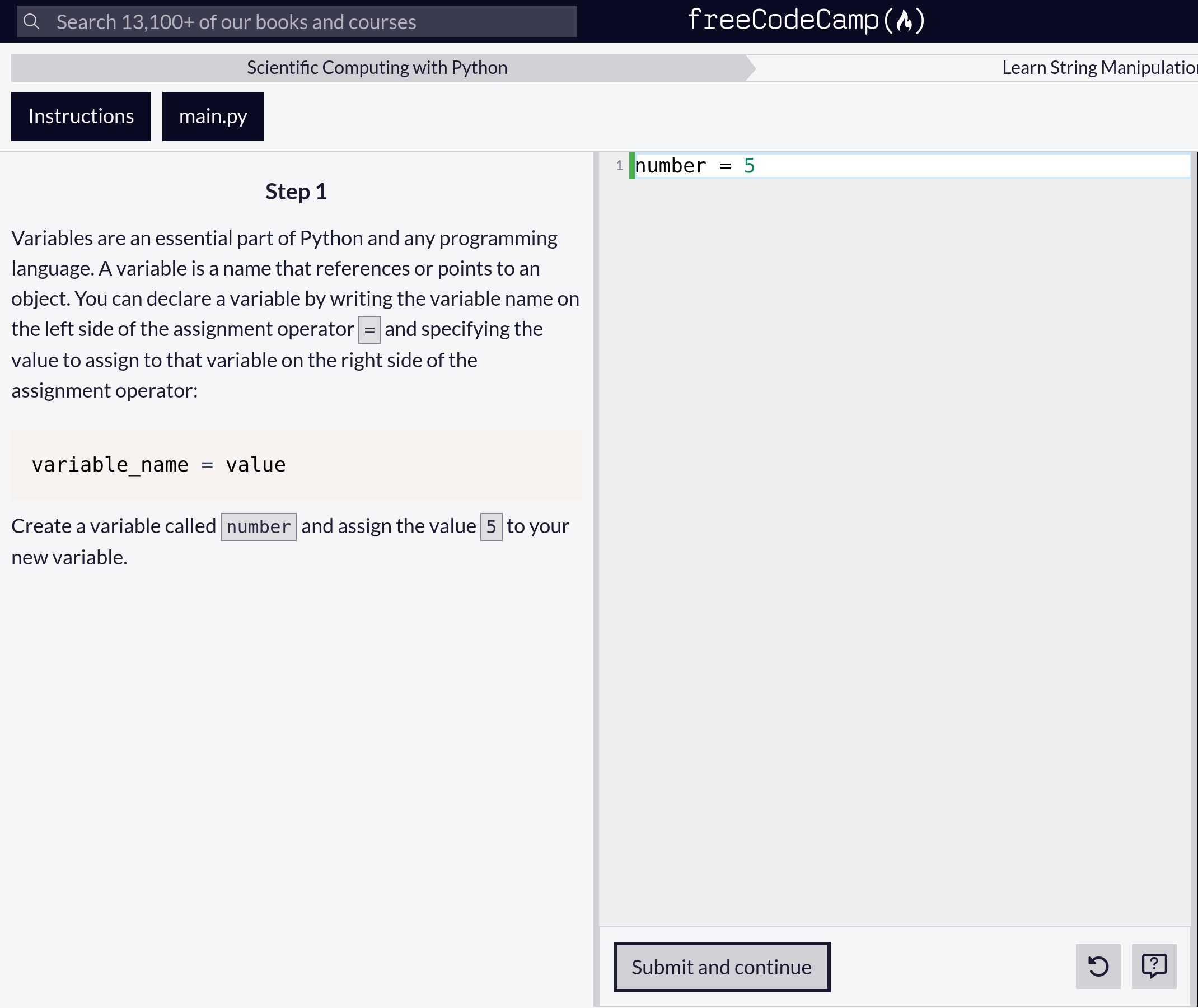
You code right in the browser, so there’s nothing to install, which removes one of the most common early stumbling blocks.
Being self-paced with no deadlines or instructor, it relies entirely on your discipline. And while the certificate is free, it isn’t as widely recognized as a university or Google credential.
7. Codecademy Learn Python 3: Best for Interactive Practice
- Format
- Short lessons you code directly in the browser
- Hours
- Self-paced
- Price
- Free Basic; Plus $29.99/month or $14.99/month billed annually; Pro $39.99/month or $19.99/month billed annually
- You’ll build
- Practice projects, with more on paid plans
Go to Learn Python 3 Opens codecademy.com
Codecademy is the best choice if watching videos puts you to sleep. Every lesson is a few lines of explanation followed by code you type and run instantly. The free Basic plan covers Codecademy’s core catalog, and paid plans add members-only content, more community support and real-world projects, with a 7-day free trial.
Codecademy’s pricing page lists a free Basic plan plus two paid tiers: Plus at $29.99 a month or $14.99 a month billed annually, and Pro at $39.99 a month or $19.99 a month billed annually. Annual billing works out to about half the monthly rate, so pay annually if you commit.
The weakness is that the browser does too much for you. Many learners finish Codecademy and then struggle to set up Python on their own computer and start a project from a blank file. Pair it with something that forces you to work locally.
8. Google IT Automation with Python: Best for an IT Career
- Format
- Video, hands-on labs and graded assignments
- Hours
- About 134 across 7 courses
- Price
- Coursera Plus, $59 a month or $399 a year
- You’ll build
- Automation scripts, Git workflows and cloud tasks
Go to Google IT Automation Opens coursera.org
Google IT Automation with Python is the most job-focused course on this list. It’s a seven-course Professional Certificate with a 4.8 rating from nearly 56,000 reviews and over a million enrolled learners. Beyond Python, it teaches Git and GitHub, debugging, configuration management with Puppet, cloud virtual machines and APIs, which are skills IT and support roles ask for.
The Google certificate gives you a recognized credential, and the labs mirror real IT tasks rather than textbook exercises.
It’s long, at about 134 hours or roughly six months at 10 hours a week, so the subscription adds up. It’s also more about IT operations than software development, so it’s not the right pick if you want to build apps.
Which Python Course Should You Choose?
The right Python course depends on how you like to learn and what you want Python for. Match yourself to one of these:
You’ve never written a line of code
Python for Everybody, using the free materials at py4e.com, then CS50P once you’re comfortable.
You want to save time at your office job
Automate the Boring Stuff. Pick one annoying task at work and automate it as you read.
You get bored by lectures
100 Days of Code for daily projects, or Codecademy for type-as-you-learn lessons.
You want an IT or support job
Google IT Automation with Python for the Google certificate and hands-on labs.
You want a free certificate
freeCodeCamp’s Python certification, which costs nothing from start to finish.
You want a computer science foundation
CS50P followed by the University of Helsinki MOOC for depth and lots of practice.
Are Free Python Courses as Good as Paid Ones?
Yes, free Python courses are as good as paid ones for learning the language. Harvard’s CS50P, the University of Helsinki MOOC, freeCodeCamp, Automate the Boring Stuff and Python for Everybody’s free materials are all excellent, and together they cover far more than any single paid course.
Paying gets you three things: a more recognized certificate, a guided structure with deadlines, and, on Udemy, a polished all-in-one project course. If none of those matter to you, you can learn Python to a job-ready level for $0. Spend the money on a good book or a domain name for your portfolio instead.
Do You Need a Python Certificate to Get a Job?
No, you don’t need a Python certificate to get a job, but a recognized one can help you get noticed when you’re changing careers. Employers hiring Python developers mostly judge you on code you’ve written: projects on GitHub, a technical interview or a take-home task.
A practical approach is to treat every course as a source of portfolio pieces. Finish CS50P’s final project, add two of your best 100 Days of Code projects, and write one automation script from Automate the Boring Stuff that solves a real problem. Three working projects with clean code say more than three certificates.
Python Course FAQs
What is the best Python course for beginners?
Python for Everybody from the University of Michigan. It assumes no experience, and its materials are free at py4e.com.
What is the best free Python course?
Harvard’s CS50P is the best free structured course. freeCodeCamp is the best if you also want a free certificate.
Can I learn Python in a month?
You can learn the basics in a month at about 15 to 20 hours a week. Getting comfortable building projects usually takes three to six months.
Is Angela Yu’s 100 Days of Code worth it?
Yes, if you buy it on sale and learn best through projects. Plan for three to five months rather than 100 days.
Should I learn Python or JavaScript first?
Python if you’re interested in data, automation or AI. JavaScript if you mainly want to build websites.
Where Should You Start?
If you’re starting from zero, open py4e.com today and work through Python for Everybody for free. When you can write a small script without looking things up, move to Harvard’s CS50P and finish its final project. That’s a strong foundation at no cost.
If you know you need projects to stay motivated, buy 100 Days of Code when Udemy runs a sale, and commit to five hours a week. Either way, keep every project you build. Those, not the certificates, are what get you hired.
You reached the last module. 3 in 100 do.
Keep going in Courses by Subject:
TopicCourses by Subject