
The easiest way to start coding, with in-browser lessons and a useful free plan. Pro suits career changers on annual billing, but certificates aren't accredited and subscriptions aren't refunded.
- Catalog quality 25%7.5
- Learning experience 20%8.5
- Value for money 20%7.0
- Certificates and outcomes 15%4.5
- Apps and usability 10%6.5
- Support and refunds 10%3.5
- Code in the browser with no setup
- Instant feedback on every exercise
- Free plan good enough to test your interest
- Career paths give a clear route into tech
- Annual billing roughly halves the price
- No refunds on subscriptions
- Certificates aren't accredited
- Hand-holding leaves gaps for real projects
- Thin for advanced developers
On this page
- What Is Codecademy and Who Runs It?
- How Learning on Codecademy Works
- What Can You Learn on Codecademy?
- Codecademy Pricing in 2026
- Monthly or Annual? The Six-Month Rule
- Is Pro Worth $60 More Than Plus?
- How Good Are the Courses?
- A Realistic First 90 Days on Codecademy
- Codecademy Pros and Cons
- How Codecademy Compares With Other Ways to Learn Code
- Who Should Use Codecademy?
- Codecademy Review FAQs
- Bottom Line on Codecademy
The quick Codecademy review: it’s one of the easiest ways to write your first lines of code, and the free plan is good enough to find out if you like programming before you pay anything. Every exercise runs inside your web browser and checks your answer on the spot, so you skip the usual setup headaches. The paid plans add projects, quizzes, career paths and certificates. The weak spots are just as clear. Codecademy holds your hand longer than real development work will, its certificates aren’t accredited, and it doesn’t refund subscriptions.
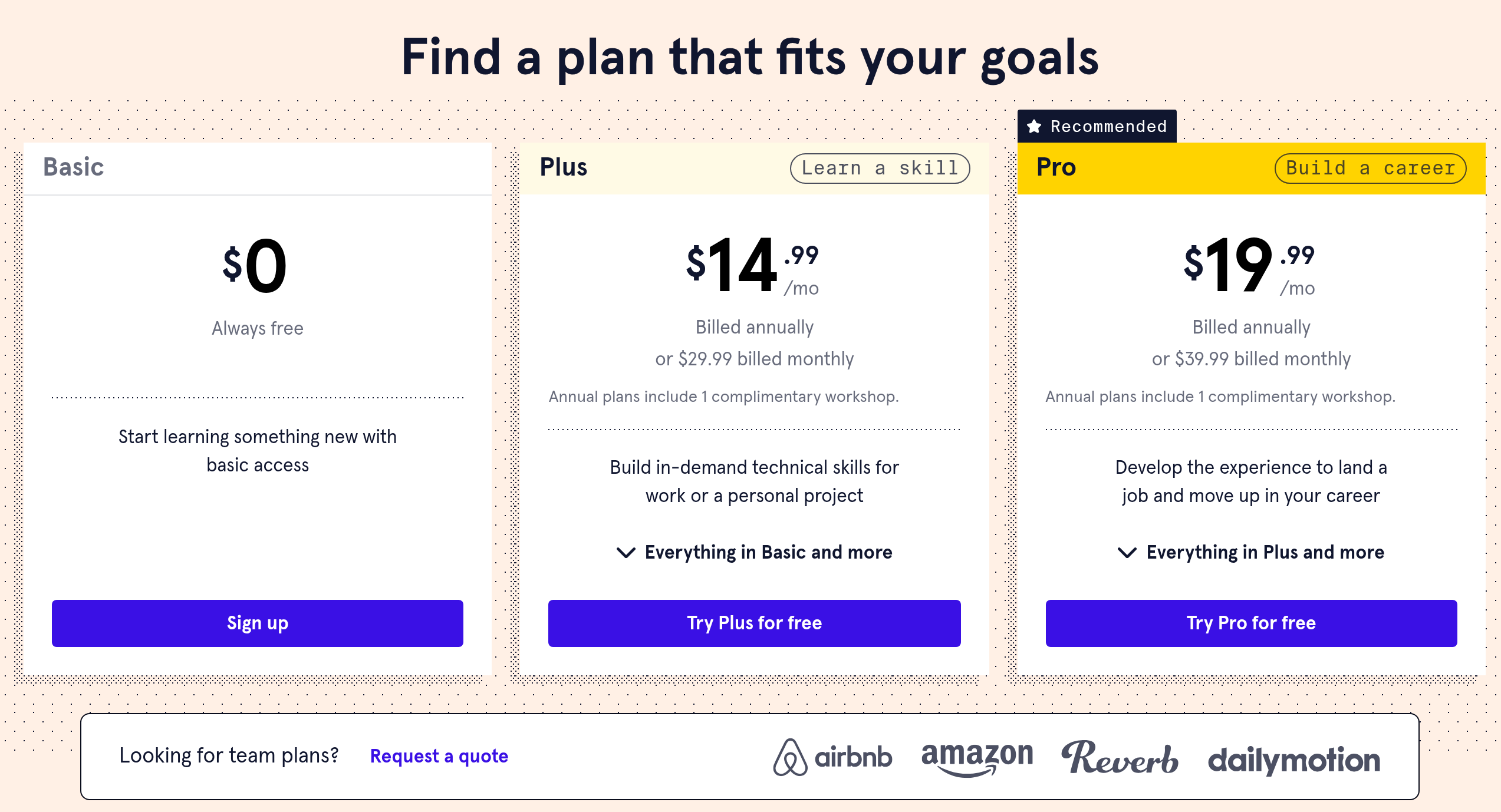
- Basic is free. Plus runs $29.99 billed monthly ($179.88 billed annually), and Pro runs $39.99 monthly ($239.88 annually), per Codecademy’s US pricing page in November 2026.
- Plus and Pro each start with a week you can use free.
- Codecademy’s help center says it doesn’t grant full or prorated refunds on subscriptions.
- Pro adds career paths, interview prep and certificates of completion.
- It’s best for beginners. Experienced developers will outgrow it quickly.
What Is Codecademy and Who Runs It?
Codecademy is an online platform for learning to code. Zach Sims and Ryan Bubinski founded it in New York in 2011, and it has been part of the corporate learning company Skillsoft since 2022. It covers more than a dozen programming languages, including Python, JavaScript, Java, SQL, C++ and Go, plus topics like web development, data science, machine learning, cybersecurity and AI.
The format is the main draw. Each lesson splits your screen into three parts: instructions on the left, a code editor in the middle and output or a preview on the right. You read a short explanation, write code, run it and get feedback within seconds. For someone who has never opened a code editor, that removes the hardest step, which is setting up a development environment before you’ve learned anything.
How Learning on Codecademy Works
Content is organized at three levels:
- Courses teach one language or tool, such as Learn Python 3 or Learn SQL.
- Skill paths combine several courses around a goal, like building a website or analyzing data.
- Career paths are longer programs built around entry-level jobs such as front-end engineer or data scientist. They mix lessons, quizzes, portfolio projects and interview practice, and many take several months at a part-time pace.
Lessons are short and practical. You learn a concept, use it right away, then repeat it in a quiz or a small exercise. Paid plans add guided projects where you build something larger, like a small game or a data report, with less step-by-step help. Codecademy has also added AI-assisted help inside lessons and a practice tool that generates extra exercises.
There’s also a mobile app, Codecademy Go, for reviewing concepts and practicing on the move. Coding itself still happens best on a computer, and the platform needs an internet connection.
What Can You Learn on Codecademy?
The catalog leans toward the skills beginners and career changers ask about most. Here’s how it breaks down, and where each area is strongest.
| Area | Typical languages and tools | How well it’s covered |
|---|---|---|
| Web development | HTML, CSS, JavaScript, React, Node.js | Its deepest area, with full front-end and full-stack paths |
| Data and analytics | Python, SQL, pandas, data visualization | Strong for beginners and analysts |
| Computer science | Python, Java, C++, data structures, algorithms | Good foundations, lighter on theory than a university course |
| AI and machine learning | Python, machine learning basics, AI tools | Growing quickly, best as an introduction |
| Cybersecurity and IT | Security fundamentals, command line, Git | Useful overviews, not exam prep for security certifications |
Everything is in English and self-paced. If you want live instruction, Codecademy is the wrong tool. If you want to practice a little every day at your own speed, it fits well.
Codecademy Pricing in 2026
Codecademy has three individual plans. These are the US prices on Codecademy’s pricing page in November 2026:
| Plan | Monthly billing | Annual billing | Main extras |
|---|---|---|---|
| Basic | Free | Free | Beginner courses and interactive lessons |
| Plus | $29.99 | $179.88 ($14.99 a month) | Full course catalog, skill paths, quizzes, projects |
| Pro | $39.99 | $239.88 ($19.99 a month) | Everything in Plus, plus career paths, interview prep and certificates |
Codecademy also sells team plans for companies. Prices can change by region and during sales, so confirm the final amount at checkout.
The refund rule matters more than usual here. Codecademy’s refund policy says it doesn’t grant refunds, full or prorated, on subscriptions. You can ask support for an exception, but you shouldn’t count on one. In practice, the free week at the start is the only safety net you get, so set a reminder before it turns into a paid plan.
Monthly or Annual? The Six-Month Rule
Because there’s no refund, picking the right billing period matters. Here’s the running total for each choice, month by month:
| Months you keep it | Plus monthly | Plus annual | Pro monthly | Pro annual |
|---|---|---|---|---|
| 2 | $59.98 | $179.88 | $79.98 | $239.88 |
| 4 | $119.96 | $179.88 | $159.96 | $239.88 |
| 6 | $179.94 | $179.88 | $239.94 | $239.88 |
| 9 | $269.91 | $179.88 | $359.91 | $239.88 |
| 12 | $359.88 | $179.88 | $479.88 | $239.88 |
Both plans break even at almost exactly six months. That gives you a simple rule:
- Under six months (one or two courses, a quick skill refresh): pay monthly and cancel when you’re done.
- Six months or more (a career path, or steady study all year): pay annually and save half.
- Not sure yet: start with the free plan, then do a single paid month before committing to a year you can’t get refunded.
Is Pro Worth $60 More Than Plus?
On annual billing, Pro costs $60 a year more than Plus. Here’s what that extra money buys and who needs it.
Career paths are the biggest difference. They take you from beginner to job-ready skills in a set order, with portfolio projects along the way. If you’re trying to switch careers and don’t want to plan your own curriculum, that structure helps.
Interview prep and career tools include technical interview practice and a job readiness check. These are useful in the last stretch before you apply, less so in month one.
Certificates of completion are a paid-plan feature, and Codecademy’s plan comparison shows Plus gets them only in limited form. They show that you finished a course or path, but they aren’t accredited and won’t carry the weight of a degree or an industry certification like AWS or CompTIA.
If you’re learning to code for a hobby, for your current job or to automate small tasks, Plus covers almost everything you’ll use. If you’re aiming for a developer or data job and want a guided route, Pro is worth it. College students should check Codecademy’s student pricing before paying full price.
How Good Are the Courses?
For beginners, the teaching is clear and well paced. Concepts arrive in small pieces, and you practice each one before moving on. The instant feedback keeps you from getting stuck on typos for an hour, which is the main reason many people quit when they try to learn from books or videos.
The common criticism, which many learner reviews raise, is the “training wheels” problem. Codecademy’s editor sets everything up for you and checks each step. Real projects don’t work that way. You have to install tools, read error messages on your own, use Git and search documentation. Learners who only ever code inside Codecademy often struggle when they open a blank project on their own computer.
The fix is simple: as soon as you finish a beginner course, build something small outside the platform. Codecademy’s later projects push you in this direction, but you’ll get there faster if you start early.
Depth is the other limit. Advanced topics are covered, but not as thoroughly as on platforms built for working developers. Codecademy is strongest from zero to solid junior level.
A Realistic First 90 Days on Codecademy
Most people who quit learning to code do it in the first few weeks. A simple plan makes that less likely. Here’s a sensible way to spend your first three months if you’re starting from zero.
- Weeks 1 to 2, free plan: take a free beginner course in Python or JavaScript. If you look forward to the lessons, you’re ready to pay.
- Weeks 3 to 8, one paid month at a time: finish one full course with its quizzes and projects. Aim for 30 to 45 minutes most days rather than long weekend sessions.
- Weeks 9 to 12, build outside the browser: install a code editor, recreate one Codecademy project on your own computer and push it to GitHub. This is where the skills start to stick.
- Day 90, decide: if you’re committed to a career path, switch to annual Pro. If coding is a side skill, stay on monthly Plus or drop back to free.
Codecademy Pros and Cons
What works
- Code in the browser with no setup
- Instant feedback on every exercise
- A free plan good enough to test your interest
- Career paths that give career changers a clear route
- Annual plans cut the price roughly in half
What doesn’t
- No refunds on subscriptions
- Certificates aren’t accredited
- Hand-holding can leave gaps when you build real projects
- Thin for advanced developers
- Monthly Pro is expensive if you study slowly
How Codecademy Compares With Other Ways to Learn Code
| Option | Cost | Best for | Trade-off compared with Codecademy |
|---|---|---|---|
| freeCodeCamp | Free | Web development on no budget | Less polished feedback, more self-direction |
| The Odin Project | Free | Learning with real tools from day one | Harder start, no in-browser hand-holding |
| Udemy | Pay per course | One specific skill or framework | Video-based, quality varies by instructor |
| Coursera | Subscription or per course | University and company certificates | More lectures, less hands-on coding |
| DataCamp | Subscription | Data science and analytics | Narrower topics, deeper in data |
Who Should Use Codecademy?
You’ve never coded and want to see if you like it
Start on the free Basic plan.
You want coding skills for your current job
Plus, on monthly billing if you only need a course or two.
You’re changing careers into tech
Pro on annual billing, and build your own projects alongside it.
You’re a college student
Pro, after checking Codecademy’s student discount.
You already work as a developer
Skip it. Documentation, specialist courses and real projects will teach you more.
Codecademy Review FAQs
Is Codecademy worth paying for?
For beginners who’ll study steadily, yes, especially on an annual plan. Try the free plan and the free first week before you pay, since subscriptions aren’t refundable.
Can Codecademy get you a job?
It can teach you job-level basics, and Pro’s career paths and interview prep help. Employers will judge you on your portfolio and interviews, not on a Codecademy certificate.
Is Codecademy free?
The Basic plan is free and includes many beginner courses. Full catalogs, projects, skill paths and career paths require Plus or Pro.
Does Codecademy offer refunds?
Its help center says subscriptions aren’t refunded, either fully or partially. You can contact support to ask for an exception.
Are Codecademy certificates recognized?
They prove you completed a course or path, but they aren’t accredited. Use them to show effort and back them up with projects you can demo.
Bottom Line on Codecademy
Codecademy is a smart starting point for new coders. The free plan lets you test the waters, Plus covers most learners and Pro is a reasonable deal for career changers who pay annually. Just plan around the no-refund rule, and start building projects outside the browser early so the skills carry over to real work.
You reached the last module. 3 in 100 do.
Keep going in Learning Platforms:
TopicLearning Platforms